The Horizontal Story Timeline layout allows you to display your stories in a left-to-right direction instead of the regular top-to-bottom flow. With the Story Timeline Widget for Elementor, you can build a horizontal timeline directly inside Elementor.
Add Story Timeline Widget
Follow these simple steps to create a Horizontal Story Timeline inside Elementor:
- From your WordPress dashboard, navigate to the Pages section.
- Click Edit with Elementor to open the page builder.
- From the Elementor widget panel, search “Story Timeline”.
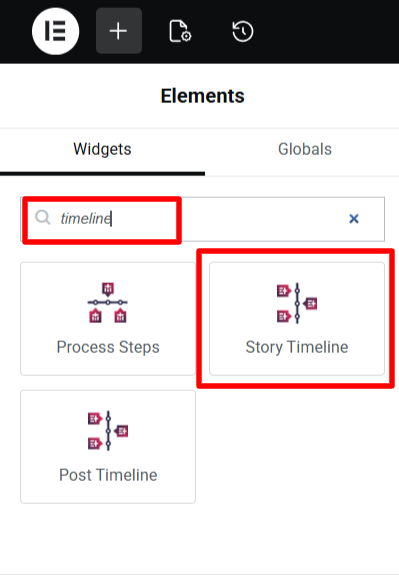
- Once added, you will see a default timeline structure appear on your page.
Timeline Settings
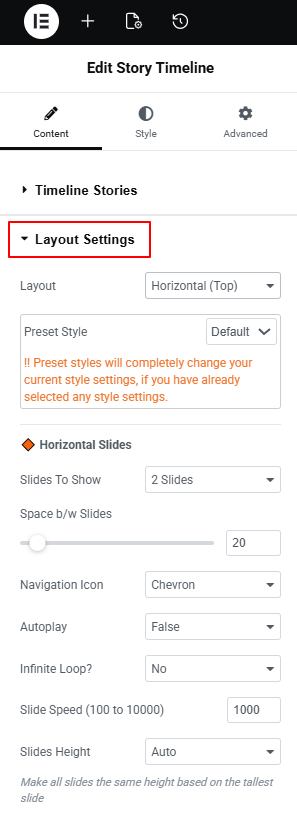
Once the widget is added, you can create a Horizontal timeline using the Layout Settings from the Content settings tab.
- Layout: Choose the layout for horizontal timeline: Horizontal (Top), Horizontal (Bottom), or Horizontal (Highlighted).
- Preset Style: Apply a ready-made design to your horizontal timeline.
- Slides To Show: Set the number of stories (slides) visible at one time in your horizontal timeline.
- Space Between Slides: Set the horizontal spacing between each story slide.
- Navigation Icon: Choose the style of navigation arrows.
- Autoplay: Turn autoplay on or off for your horizontal timeline. When enabled, the timeline will automatically slide through stories one by one without user interaction.
- Infinite Loop: Select yes if you want the slider to move in loop continuously.
- Slide Speed (100 to 10,000): Set how fast the stories should move in autoplay mode.
- Slides Height: Choose whether you want each slide to adjust its own content height or all slides match the height of the tallest slide.
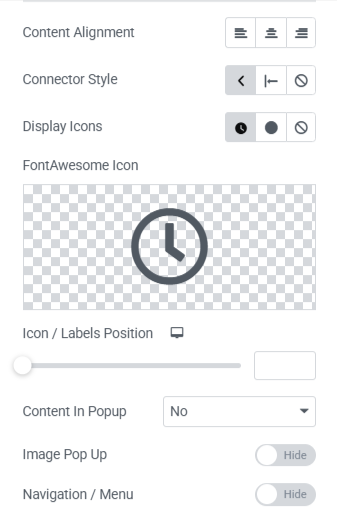
- Content Alignment: Control how the text inside each story box is aligned: Left, Center, or Right.
- Connector Style: Choose the connector style for timeline stories.
- Display Icons: Choose the type of icons from custom or dot.
- Icon / Labels Position: Adjust the position of timeline icons and labels.
- Content in Popup: Enable this if you want the full story content to open in a pop-up when users click on a story.
- Image Pop Up: Enable this option if you want the story image to open in a lightbox pop-up.
- Navigation / Menu: Enable navigation buttons or menu to help users move through the timeline easily.
After being satisfied with all the changes, publish your page and preview it.